

The Real Cost of Stripe on WordPress: Plugin Fees and Break-Even Calculator
Stripe fees are fixed, but plugin fees are a choice. Use this simple break-even calculator to see when a free Stripe plugin stops being free. The post The Real Cost of Stripe on WordPress: Plugin Fees and Break-Even Calculator appeared first on Themeisle Blog.
Open Channels FM: Balancing Tradition and Innovation in Genealogy During the Era of Artificial Intelligence
I makes genealogy faster and more accurate while Charleen Mullenweg explains the ongoing need for human review.
Open Channels FM: Invisible Unicode Attacks, CrowdSec Source Leak, and the AI Coding Boom Explored
Invisible characters challenge spam filters, CrowdSec deals with a code leak, and AI is shifting what matters in software development.
bbPress: bbPress 2.6.18 is out!
bbPress 2.6.18 is a maintenance release focused on forum imports and first-login password upgrades. Imported users can now upgrade their passwords on first login for more legacy forum formats, including cases where the original forum database is no longer available. This release also corrects PHPWind topic statuses, reply counts, and forum dates during import, and restores Super Moderator edit links on front-end bbPress user screens. bbPress 2.6.18 requires PHP 7.2 or newer and WordPress 6.0 or newer. Sites running an older PHP version should update PHP before upgrading bbPress. Read the 2.6.18 upgrade notes for importer compatibility details. These changes are also in the 2.7 development branch. The Plugin Directory’s development trunk remains at 2.7.0-alpha-3. Download bbPress 2.6.18 from WordPress.org, or update from your WordPress dashboard.
WordPress.org blog: WordPress Takes Its Turn Leading the Open Website Alliance
I’m happy to announce that I am now serving as president of the Open Website Alliance (OWA), representing the WordPress Foundation. The Alliance brings together the community organizations behind Drupal, Joomla!, TYPO3, and WordPress to advocate for open source and share practices that benefit their projects. I represent the WordPress Foundation in this role, which rotates among the Alliance’s members. WordPress announced its participation in the Alliance in 2024, building on our work with Drupal, Joomla!, and TYPO3 to respond to the European Union’s Cyber Resilience Act. While many open source projects focus on underlying digital infrastructure, our content management systems power the websites where businesses reach customers and sell products and services. We asked policymakers to account for that economic role when setting security requirements, while respecting how communities of developers, translators, educators, and other contributors build and maintain the software. We share a belief that everyone should have the freedom to use, change, and share the tools they rely on. This commitment to openness builds on efforts such WordPress’s recent signing of the Open Weights and American AI Leadership letter. Our mission to democratize publishing means giving anyone a voice and welcoming everyone to contribute. Working with other communities puts those values into practice beyond WordPress, supporting the freedoms that make participation possible. I invite you to read the Open Website Alliance charter to learn more about the commitments its members share and how the Alliance works.
OpenStation Blog: Drag, Drop, Preview: An Ordinary Day Writing in OpenStation

I started writing a post (this post!). Then, as usually happens, I needed a picture, so I dragged one straight from my desktop into OpenStation. No downloading, no extra tabs needed, no extra spaces in the editor, no more “in which tab was the image!?”… I just dragged it from my desktop… Done! And then I thought the post was already descriptive enough to tell how much we enjoy creating content in OpenStation… But I missed the preview. I wanted to see what the post would look like and edit it in real time. And it happened, I just had to click on the eye icon in the title bar of this editor. This is probably my favourite kind of productivity, the boring stuff becoming pleasantly simple… And yes, this whole post was written while recording the video But I thought that a quick sanity review from one of my bots would make the post nicer for SEO. So I just saved the draft, and gave it to my agent
Stripe Payment Links vs Embedded WordPress Forms: Which Should You Use?
Should you share a Stripe Payment Link or embed a payment form on your WordPress site? Compare setup, branding, features, and real costs. The post Stripe Payment Links vs Embedded WordPress Forms: Which Should You Use? appeared first on Themeisle Blog.
Open Channels FM: AI for the Rest of Us, Beyond the Bubble
Bob Dunn talks about breaking out of AI echo chambers to gain new insights
How to Build a WooCommerce Print Shop Order Form With File Upload
Build a WooCommerce print-shop page where customers upload artwork, pick a size, and unlock bulk discounts. Step-by-step PPOM walkthrough inside! The post How to Build a WooCommerce Print Shop Order Form With File Upload appeared first on Themeisle Blog.
OpenStation Blog: A better way to use WordPress
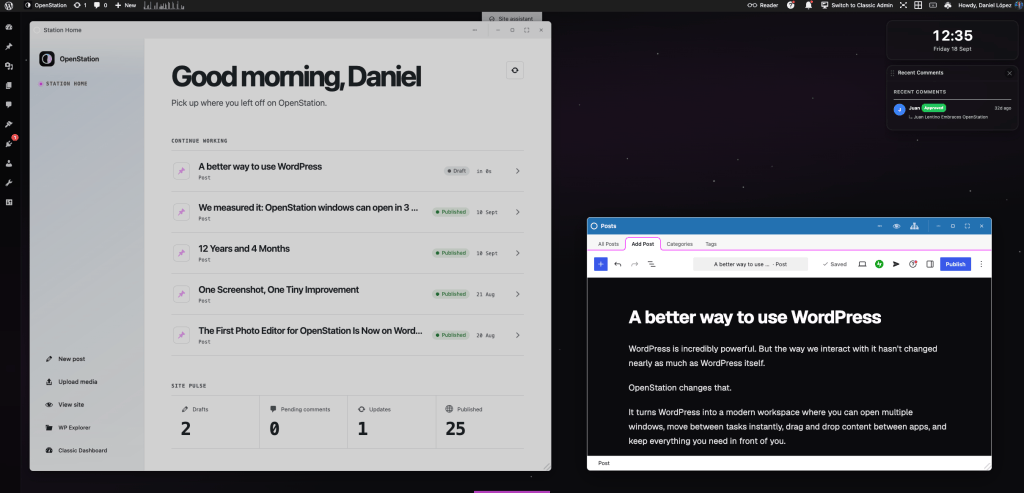
I have been using WordPress for a long time, and I still love it. But wp-admin has basically worked in the same way for years. OpenStation is our attempt to change that. It’s a simple idea: instead of moving from one admin page to another, you have a desktop where you can open different parts of WordPress at the same time. Your WordPress. Your workspace. You can open your posts, pages, media, plugins, WooCommerce or any OpenStation app in different windows. You can move them around, minimize them or put two things next to each other. It may sound like a small difference, but once you start using WordPress this way, it changes a lot. Real-time previews You can also see your changes while you are working on them. No need to constantly jump between wp-admin and the frontend just to check how something looks. Apps inside WordPress This is one of my favorite parts. We are building apps like AllTerrain Forms, Photo Editor (And more!) specifically for OpenStation. They are still WordPress plugins, but they feel much more like normal desktop apps. WordPress on your phone We also wanted OpenStation to work properly on mobile. You can install it as a PWA and use WordPress from your phone almost like any other app. Performance Is Fast. Really fast. OpenStation is not only about changing how WordPress looks. We have put a lot of work into making it fast. In many cases, opening and moving between WordPress screens is faster than using them directly from wp-admin. We are also working on caching and preloading parts of WordPress before you need them. The goal is very simple: you click something and it opens FAST. And it is still WordPress This is important. We are not trying to replace WordPress or build another platform on top of it. Your plugins are still your plugins. WooCommerce is still WooCommerce. Your content stays in WordPress. OpenStation just gives you a different way to use all of it. And, of course, it is open source. Thank you And finally, a big thank you to everyone in the WordPress community who has tried OpenStation, shared feedback, reported bugs or simply told others about it. And especially to all the contributors who are helping us build it. OpenStation would not be what it is today without you. There is still a lot we want to do, and seeing people contributing, experimenting and building things with OpenStation is probably the best part of the whole project. Thank you